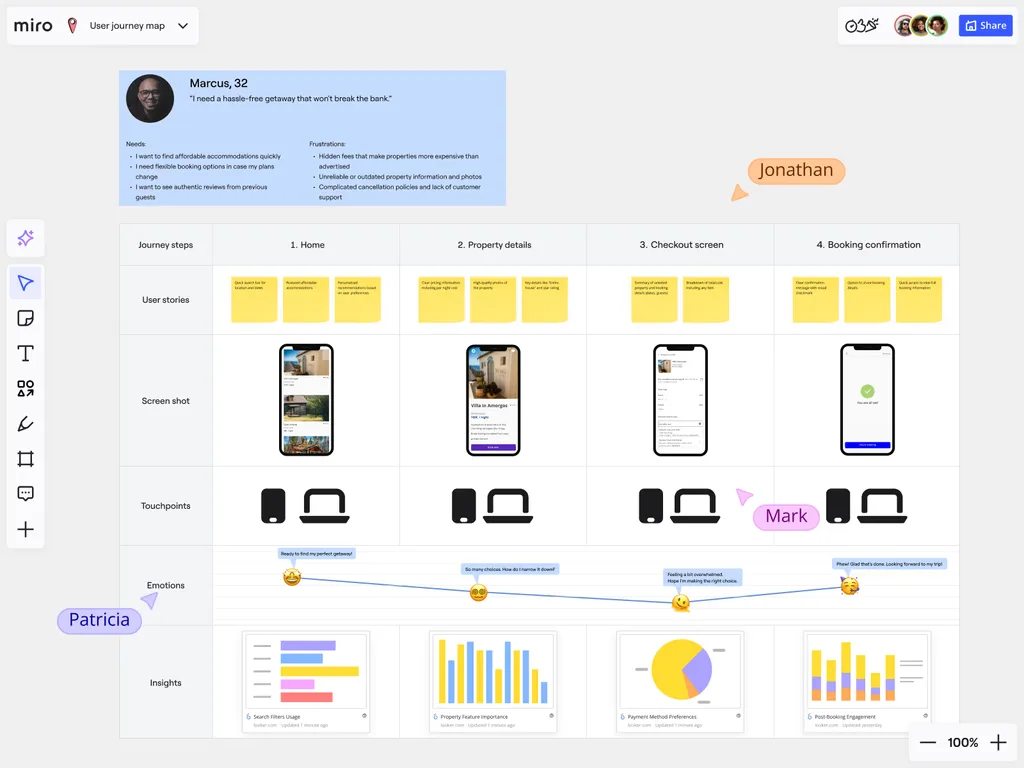
Customer Journey Mapping customization features
Customer journey maps are powerful tools for understanding how people interact and view your business. With Miro, you can adapt journey mapping frameworks to match your workflows, branding, and schedules. This gives your team a consistent and comprehensive customer journey mapping tool to capture insights and share across the company.
Because Miro is enterprise-ready, these maps scale from small teams to hundreds of collaborators without performance issues. With an infinite canvas, you can consolidate massive amounts of information into one shared space, from personas and emotions to touchpoints and supporting data. We keep even complex, multi-team journeys aligned.
Creating Custom Journey Mapping Templates
A customer journey map template means you don’t need to start from scratch every time. In Miro, you can build a bespoke customer journey with templates tailored to your industry, or even a specific customer persona. You can even create AI shortcuts to build your own one-click actions and streamline processes.
Using Miro AI, you can also cluster customer feedback, summarize sticky notes from workshops, and generate quick insights. This helps you refine journey maps faster, with fewer assumptions.
Once created, these templates are shareable across your entire organisation, ensuring alignment for every team. You all know which customers you’re serving.
Custom templates can be published internally for your company or shared externally through the Miroverse if you want to contribute to our global community of over 6,000 templates.
Shareable templates helps to avoid repetitive setup work, keeping journey mapping consistent across projects. It also means you can onboard new team members more quickly by giving them a customer journey map example to use straight away.
For more advanced needs, you can build custom frameworks with the Miro Developer Platform, tailoring maps with apps or integrations that fit your workflow.
1. Define Your Mapping Purpose
Begin by clarifying why you’re creating a customer journey map.
- Do you want to enhance certain customer interactions?
- Reveal reasons for churn?
- Or see where potential customers drop off?
Defining your goals at the beginning ensures the mapping exercise leads to actionable insights. Not broad assumptions.
2. Choose Your Target Audience
We advise choosing one single customer segment to analyze at a time. Focusing on one audience type helps to capture certain insights and paint a more detailed picture of what those customers are experiencing. This helps you empathize with them better, too.
To speed up the process, you can start with a persona template from the Miroverse and then customize it to reflect your target audience.
3. Map Customer Interaction Points
From first awareness through to advocacy, we recommend making a list of every touchpoint where customers engage with your brand. Documenting these moments makes it easier to see where friction exists and where you could improve the overall experience. With our synced copies functionality, you can distribute the same touchpoint map across multiple boards, keeping marketing, CX, and operations in sync with the latest version.
Our two-way integrations functionality also means you can convert pain points directly into action items that sync back into your project systems, like Jira or Asana.
4. Experience the Journey Firsthand
Make an effort to walk through the customer journey yourself. This hands-on approach reveals any disparity between what you believe the experience looks like and what actually happens, often revealing opportunities that make meaningful improvements. Sometimes we forget that we are all customers ourselves and can therefore identify what a good customer experience is. Use that to your advantage.
In Miro, breakout frames and private mode allow for small groups or individual exercises during journey workshops, keeping everyone engaged and focused. To further support this, you can present directly from your journey map with interactive features like timers, voting, and live reactions. This helps your teams experience the flows together instead of passively watching slides.
Applying Brand Identity to Customer Journey Maps
With Miro’s Brand Center, you can apply your own logos, fonts and color palette into your journey maps. This helps every map look polished and professional, immediately suitable for important internal presentations. Styles in Miro makes it easy to apply professional color palettes across entire frames, maintaining consistency and accessibility for everyone.
Building Custom Journey Mapping Frameworks
No two industries are the same, and neither are their customer journeys. Miro allows you to create frameworks that reflect the unique touchpoints, compliance requirements, and customer behavior your business needs to think about.
Miro’s developer platform even lets you extend this further, by building custom apps or integrations that pull in live data (from Jira, Salesforce, or analytics tools) directly into your journey maps. A custom template allows you to capture nuances that generic templates may miss, ensuring your journey maps mirror the real-world complexities of your market.
Customizing Journey Stages and Touchpoints
Rather than sticking with standard journey stages (awareness, consideration, purchase, retention, advocacy), adapt them to your own business model.
This flexibility ensures your customer journey map reflects how your customers actually move through your funnel or cycle. In turn, more targeted improvements and relevant insights for your team are created.
Developing Industry-Specific Customer Journey Templates
If your work involves a lot of unique regulatory needs, specialized buyer behavior, or niche touchpoints, you can design templates that account for these nuances from the very beginning. These tailored templates can then be shared company-wide to ensure everyone applies the same best practices. Stay compliant, align with industry standards, and capture the details that matter in your sector.
Enterprise teams can also set sharing policies and domain controls to ensure sensitive journey maps remain private and compliant with GDPR or industry regulations. Plus, admins can benefit from SSO, SCIM, and robust permission controls, ensuring tight management of sensitive journey maps.
Customize your Journey Maps with Miro
From defining goals and mapping touchpoints to applying your brand identity, customizing customer journey maps in Miro makes understanding your customers both easier and smarter. Miro also consolidates over 160 integrations into one workspace, so you won’t waste time switching between tools. Everything from research docs to Jira tickets can live alongside your journey maps. If you’re ready to turn insights into action, dive into Miro and start building.
FAQs
Can you save a customized journey map as a template for your team?
Yes. Once you’ve designed a journey map that reflects your organization’s unique processes or customer segments, you can save it as a custom template that can be used again and again. This means every project starts from the same framework, helping teams save time setting up. It also allows you to generate specific insights without rebuilding the map from nothing.
How do Miro’s Brand Center capabilities help with journey mapping?
The Brand Center makes it easy to apply your company’s fonts, colors, and logos to your boards. Whether you’re sharing with your team or clients, it gives your maps a professional and tailored edge.
When building customer journey maps, this means your templates and outputs stay professionally branded and ready to present.
Can you change the default stages on a template to match your business?
Yes. The default journey stages, like Awareness or Consideration, can be adapted to mirror your business’ own customer lifecycle.
For example, you may want to add stages to capture touchpoints specific to your industry. This way, your map reflects the real interactions your customers have with your business.
You can also be interested in:
- A comprehensive look at analytics and reporting for Customer Journey Mapping
- Develop Customer Journey Mapping Templates With Miro’s Community
- Customer Journey Data Visualization in Miro
- Connect 160+ Customer Journey Map Software Integrations in Miro
- Pricing for Miro’s Customer Journey Map Maker
Author: Miro Team Last update: October 6, 2025
Join our 100M+ users today


