
Table of contents
Table of contents
How to build a customer journey map for email marketing (with templates and real examples)
Summary
In this guide, you'll learn:
- How to map the 5 stages of email marketing customer journey — from awareness through advocacy — with specific triggers, messaging strategies, and metrics for each phase.
- A step-by-step framework for building your first journey map — including how to define personas, identify gaps, and design automation workflows that convert 40% faster than building blindly in your ESP.
- How Miro AI cuts journey mapping time from days to hours — automatically analyzing customer research, clustering feedback themes, and generating actionable insights from scattered documentation.
- Real metrics from Kolleno's transformation — how visual journey mapping delivered 75% productivity increases and 50% more efficient meetings by eliminating multi-channel campaign chaos.
- Which templates accelerate your start — pre-built frameworks for email automation flows, cross-functional collaboration, and feature launch communications that save 2-3 hours of setup.
- Best practices that prevent common mistakes — why mapping before automating matters, how to design for segments without over-complicating, and keeping journey maps alive as living strategy documents.
- How journey-based emails outperform generic campaigns — the data showing 30x more revenue per recipient and 10-15% cart recovery rates when timing matches customer behavior.
Customer journey email marketing explained
Your welcome email gets a 42% open rate. Your promotional email? Only 11%. Same audience, same sender, but very different results. The difference isn’t the subject line. The first email meets customers where they are in their journey, while the second treats everyone like strangers.
Generic batch-and-blast emails don’t work for today’s buyers, who expect personalized experiences. In fact, 76% of customers feel frustrated when they don’t get this, according to McKinsey. Still, most marketing teams struggle to coordinate campaigns across channels, deal with disconnected tools, and spend hours in meetings just to stay aligned.
Visual customer journey mapping turns random email sends into strategic conversations that help guide customers to success. When you can actually see how each email connects to the customer’s experience, your whole team can focus on delivering value at the right moment.
This guide will show you how to build an email marketing customer journey map that brings your team together, closes gaps in your strategy, and helps turn automation into revenue. We’ll cover a proven framework, share a real example from a B2B SaaS company that boosted productivity by 75%, and provide templates you can use right away.
What is an email marketing customer journey map?
An email marketing customer journey map is a visual representation showing how customers interact with your email program from first contact through long-term engagement—including their actions, emotions, pain points, and your email touchpoints at each stage.
Think of it like GPS for your email strategy. Instead of guessing what to send next, you follow a map that shows where customers are and what they need.
Why email customer journey mapping matters
Stop sending emails customers ignore
Most teams send emails based on a calendar, not on when customers are ready. There’s a big difference between sending a promotion during a confusing onboarding and sending an abandoned cart email when someone is thinking about buying. Journey-based emails can generate up to 30 times more revenue per recipient than batch campaigns, according to Klaviyo’s benchmarks.
Get marketing and sales aligned (finally)
Sales says leads aren’t qualified. Marketing says sales doesn’t follow up. Sound familiar? A customer journey email marketing map shows exactly when the MQL to SQL transition happens and what nurturing is needed before the handoff.
When DocuSign’s research and design teams needed to scale collaboration across their global organization, they turned to visual mapping to build a customer-centric culture. Jane Ashley, Head of Design at DocuSign, explains that visibility and accessibility became key components to their success. “Design and research teams require visual, flexible spaces to collaborate and solve complex problems to design and deliver top-notch products to customers,” she notes. The result? 90% of DocuSign users say if they stopped using Miro it would have a negative impact on their work.
Find where prospects leak out of your funnel
Visual maps reveal gaps right away. You might find you send a welcome series, then nothing for 45 days until the next promotion. Teams can spot missing touchpoints, bad timing, and message conflicts that are easy to miss in spreadsheets.
How it’s different from other tools
- vs. Marketing funnel: A funnel tracks your internal pipeline stages. A journey map captures the customer’s actual experience and emotions.
- vs. Email calendar: A calendar shows what you send and when. A journey map shows why and when based on customer behavior.
- vs. Automation workflow: Workflows execute your strategy. Journey maps design the strategy that informs those workflows.
The 5 stages of email marketing customer journey
Every business is different, but effective email journeys usually follow five clear stages. Here’s how to match emails to each phase and what customers need at each step.
Stage 1: Awareness (discovery)
Customer mindset: “I have a problem. Who can help?”
At this stage, potential customers are just discovering your brand. They might find you through organic search, download a lead magnet, register for a webinar, or subscribe to your blog.
Email strategy for awareness:
- Welcome series (1-3 emails)
- Deliver promised value immediately
- Set expectations for future communication
- Keep it educational, not promotional
Key metrics to track:
- Welcome email open rate (benchmark: 50-60% according to email marketing benchmarks)
- Click-through to key resources
- Sign-up source tracking
Example sequence:
- Email 1 (immediate): Thank you + deliver the resource they requested
- Email 2 (Day 3): “How [their role] uses our content to [achieve outcome]”
- Email 3 (Day 7): Gentle product introduction focused on value
Common mistakes: Asking for the sale too soon, overwhelming new subscribers with information, or providing no clear next step.
Stage 2: Consideration (evaluation)
Customer mindset: “Is this the right solution for me?”
During consideration, prospects are actively researching. They’re visiting your pricing page, reading case studies, comparing you to competitors, and evaluating whether your solution fits their needs.
Email strategy for consideration:
- Educational drip campaigns
- Case studies with concrete ROI metrics
- Feature-benefit messaging tied to outcomes
- Honest comparison guides that show your strengths
Behavioral triggers to automate:
- Pricing page visit → Send ROI calculator
- Case study read → Send relevant customer story
- 3+ blog posts read → Offer product demo
- Trial sign-up → Launch onboarding sequence
Key metrics:
- Email engagement rate
- Content download rate
- Demo request conversion
- Time spent in consideration stage
Example B2B sequence:
When a buyer downloads your comparison guide, don’t just mark them as “engaged” in your CRM. Map to their actual research behavior:
- Email 1: “3 questions to ask before choosing [product category]”
- Email 2 (if they clicked): Customer story with specific ROI metrics
- Email 3 (if they clicked again): “See how it works” demo CTA
This sequence maps to real buyer behavior, not an arbitrary calendar schedule. That’s the difference between customer journey email marketing and generic nurture campaigns.
Stage 3: Conversion (purchase/sign-up)
Customer mindset: “I’m ready, but need final confidence”
At conversion, prospects are taking action—starting free trials, adding items to cart, or submitting forms. They want to move forward but may need that final push.
Email strategy for conversion:
- Abandoned cart recovery (1hr, 24hrs, 72hrs sequence)
- Trial activation assistance
- Social proof injection
- Risk reduction (guarantees, testimonials)
- Genuine urgency when appropriate
Critical automation workflows:
Cart abandonment is particularly powerful. Abandoned cart emails recover 10-15% of lost sales when sent within the first 24 hours, but that percentage drops to 2-3% after 72 hours. Timing matters.
Key metrics:
- Cart recovery rate
- Trial-to-paid conversion rate
- Time to first value
- Purchase confirmation engagement
What to avoid: False scarcity tactics or aggressive pressure that damages trust. Your customer journey email marketing should build confidence, not create anxiety.
Stage 4: Retention (engagement & growth)
Customer mindset: “Am I getting value? Should I stay?”
Retention is where you prove your worth. Customers are evaluating whether they’re getting value from their purchase or whether they should churn.
Email strategy for retention:
- Onboarding completion sequences
- Feature adoption campaigns
- Usage tips and best practices
- Value reinforcement touchpoints
- Strategic upsell (when truly relevant)
Behavioral segmentation matters here:
- Power users → Advanced features, beta access, community leadership
- Moderate users → Tips to increase value, new use cases
- Low users → Re-engagement, support offers, churn prevention
Key metrics:
- Feature adoption rate
- Customer health score
- Engagement trend (increasing vs. declining)
- Support ticket volume
Example workflow:
- Day 7: “Getting the most from [feature]”
- Day 14: Usage summary + personalized tips
- Day 30: “Customers like you also use [complementary feature]”
- Day 60: Check-in + consultation offer if low usage detected
Why retention matters: Acquiring a new customer costs 5-25x more than retaining an existing one, according to Harvard Business Review. Journey mapping helps you keep customers engaged and growing their account value.
Stage 5: Advocacy (loyalty & referral)
Customer mindset: “This is great—others should know”
At advocacy, satisfied customers become promoters. They’re ready to leave reviews, refer colleagues, and share their success stories.
Email strategy for advocacy:
- Review/testimonial requests timed after success moments
- Referral incentive programs
- VIP/loyalty recognition
- User-generated content requests
Optimal timing for advocacy asks:
- After positive support interactions
- Following key milestone achievements
- When customers report success metrics
- Long-term customer anniversaries
Key metrics:
- Net Promoter Score (NPS)
- Review submission rate
- Referral conversion rate
- Advocacy-driven acquisition percentage
Advanced tactic: Create an advocate-only email track with exclusive content, early feature access, and community leadership opportunities. Make advocates feel like the VIPs they are.
How to build your email marketing customer journey map: Step-by-step
Building an effective journey map isn’t about being perfect; it’s about being clear. Use this six-step framework to create a map that brings your team together and turns your email strategy from guesswork into a clear plan.
Step 1: Define your persona and journey scope
Don’t try to map everyone. Start with a specific group.
Create a focused persona:
- Name & Role: “Sarah, Marketing Director at 50-person B2B SaaS”
- Goal: Improve campaign ROI and prove marketing impact
- Pain points: Disconnected tools, unclear attribution, sales/marketing misalignment
- Decision criteria: Visual collaboration, real-time updates, easy stakeholder sharing
Pick one specific journey:
❌ Don’t map: “All email interactions with all customers”
✅ Do map: “Free trial sign-up to paid customer” OR “Newsletter subscriber to marketing qualified lead”
Why narrow focus works:
Starting with a specific focus gives you clearer insights into customer needs, helps you spot gaps and opportunities, and lets you build and test faster. Once you succeed with one journey, you can expand to others.
Pro tip: Start with your highest-value conversion path. If 60% of your revenue comes from trial conversions, map that journey first.
Step 2: Map current touchpoints and customer actions
Create a horizontal timeline across your journey stages.
For each touchpoint, document:
- Customer action: What did they do? (signed up, downloaded guide, abandoned cart)
- Your email response: What automated or manual email did they receive?
- Other channels: What else happened? (social ad, sales call, product usage)
- Timing: When did this occur in their journey?
Use visual swim lanes for clarity:
Row 1: Customer actions & behaviors Row 2: Email touchpoints Row 3: Other marketing touchpoints Row 4: Sales/Product/Support touchpoints Row 5: Systems/Tools involved
A real discovery from visual mapping:
When Kolleno’s team mapped their multi-channel campaigns visually in Miro, they discovered seven places where email, LinkedIn, and direct mail accidentally duplicated the same message within 24 hours—creating prospect fatigue instead of engagement. They also found three critical gaps where customers went silent for 2-3 weeks with zero touchpoints.
Common discovery: Most teams find 2-3 critical gaps where customers go silent for weeks, then wonder why prospects go cold.
Template to get started:
Miro’s New Customer Journey - Emails Automations template provides a structured framework for mapping email touchpoints across your customer journey. It’s designed specifically for coordinating multi-channel campaigns and visualizing how email fits into the broader customer experience.
Step 3: Add customer thoughts, feelings, and pain points
Go beyond just actions. Add the human side to your email marketing customer journey map.
For each stage, capture:
- Thinks: “Is this worth the investment?”
- Feels: Excited, overwhelmed, skeptical, confident
- Pain points: Too many steps, unclear value, lack of information
Data sources for authentic insights:
- Customer interviews (best source)
- Sales call recordings
- Support ticket patterns
- Survey responses
- Review comments and feedback
Why this transforms your strategy:
Without emotion mapping: “Day 7: User hasn’t activated premium feature”
With emotion mapping: "Day 7: User hasn’t activated premium feature
- Thinks: ‘Maybe I don’t need this?’
- Feels: Uncertain about value, slightly overwhelmed
Pain: Unclear ROI, too many options
→ Email fix: Simple single-feature focus with clear value metric showing time saved"
The result: Your emails speak to actual customer mindset, not just their behavior. This is what separates strategic customer journey email marketing from generic email blasts.
Step 4: Identify gaps, friction points, and opportunities
Now analyze your completed map for issues and opportunities.
1. Missing touchpoints
Look for long gaps between emails, those “black hole” periods when customers disappear. Common examples are stages with no nurture sequence, behavioral triggers with no follow-up, or a welcome series that ends at Day 7 and nothing until Day 45.
2. Timing problems
Watch for promotional emails sent during onboarding confusion, educational content delayed until after customers have formed bad habits, or urgency messages sent to customers who already purchased yesterday.
3. Message misalignment
Check whether your email tone matches customer emotion, if you’re leading with features when customers need outcomes, or if you’re sending generic messaging to diverse segments. For example, sending the same “power user tips” to struggling beginners creates frustration, not engagement.
4. Cross-channel conflicts
Look for sales calling while automated “intro” sequences continue, support solving problems while automation asks “have you tried X?”, or social retargeting ads contradicting your email messages.
Visual advantage in action:
When teams look at the map together, gaps are easy to spot. The silence between Day 7 onboarding and the Day 45 renewal reminder stands out. This is why visual collaboration works better than spreadsheets.
Prioritize your findings:
- 🔴 Quick wins: High impact, easy to implement
- 🟡 Strategic investments: High impact, requires resources
- 🟢 Future considerations: Lower priority
The Atlassian Customer Journey Mapping template helps teams identify these gaps by providing structured sections for mapping customer actions, emotions, and touchpoints in a single view.
Step 5: Design improved journey and workflows
This is the step where your email marketing customer journey map turns insights into action.
For each stage, specify:
- Success criteria: What “done” looks like for this stage
- Email sequence: Specific sends with clear purpose
- Triggers: Behavioral vs. time-based activation
- Content needs: What value each email delivers
- Branch logic: Different paths for different behaviors
Sample workflow specification:
TRIGGER: Cart abandoned 2+ hours
SEQUENCE:
Email 1 (2 hours later)
- Subject: "Still thinking about [product]?"
- Content: Gentle reminder + showcase benefit
- Branch: Clicked? → Send targeted follow-up
Not clicked? → Wait 22 hours
Email 2 (24 hours after abandonment)
- Subject: "[Customer name], here's what you're missing"
- Content: Add social proof from customers like them
- Branch: Clicked? → Send limited-time offer
Not clicked? → Wait 48 hours
Email 3 (72 hours after abandonment)
- Subject: "Last chance: Your cart expires soon"
- Content: Final reminder + risk-reduction guarantee
- Exit: Purchased OR cart expires
Connect journey maps to execution:
Your completed map becomes the blueprint for:
- Email automation platform setup
- Content creation briefs for your writers
- A/B testing roadmap prioritization
- Team responsibility matrix
Real impact: Teams that start with visual mapping cut automation build time by 40% because they design the whole journey, not just single emails. There’s no need to translate slides into tasks; you move straight from strategy to execution.
When launching new features, the Feature Launch Communication template helps you plan the email journey around product releases, ensuring all stakeholders understand the communication plan and timing.
Step 6: Collaborate cross-functionally
Customer journey email marketing won’t succeed if it’s done in isolation. You need input from different teams.
Why each team matters:
- Marketing: Strategy and creative messaging
- Sales: Qualifying criteria and real objection handling
- Product: Usage patterns and feature adoption triggers
- Customer Success: Support patterns and early churn signals
- Analytics: Metrics, tracking, and behavioral data interpretation
Workshop best practices:
Schedule a 90- to 120-minute journey mapping session. Use a visual workspace where everyone can edit at the same time, not just a static presentation controlled by one person. Record decisions directly on the board. Set aside non-essential ideas in a “Future Considerations” section. Make sure each touchpoint has a clear owner before the meeting ends.
Real results from cross-functional mapping:
When Kolleno brought their marketing, sales, and product teams together for visual journey mapping, they saved 3-5 hours weekly by eliminating follow-up clarification meetings. Decisions made together visually stick better than endless email threads. Everyone could see dependencies, handoffs, and gaps immediately.
DocuSign experienced similar benefits when they adopted visual collaboration for customer-centric design. As their teams needed to balance new ways of working while reducing complexity, Miro’s visual platform fostered both real-time and asynchronous collaboration, ensuring everyone shared a single, unified view of the customer experience.
How Miro AI accelerates customer journey mapping
Building a complete email marketing customer journey map from scratch can feel overwhelming. Where should you start? Which customer insights matter most? How do you turn scattered feedback into useful patterns?
Miro AI’s intelligent capabilities transform hours of manual work into minutes of strategic insight, helping marketing teams move from blank canvas to actionable journey map faster than ever.
Turn research into insights automatically
Customer research creates a lot of data, like interview transcripts, survey responses, support tickets, and sales call notes. Manually sorting through this feedback to find patterns can take days. Miro AI does it in seconds.
How it works:
Upload your research artifacts—interview notes, customer feedback documents, survey results—directly to your Miro board. Miro AI analyzes the content and automatically extracts key themes, pain points, and customer quotes. Instead of reading through hundreds of pages looking for patterns, you get organized insights clustered by topic.
Real application for email journey mapping:
When building your email marketing customer journey map, you need to understand what customers think and feel at each stage. Miro AI processes your research and surfaces patterns like:
- “Customers repeatedly mention feeling ‘overwhelmed’ during onboarding”
- “Price concerns appear most frequently during consideration stage”
- “Support interactions spike around Day 14—indicating common friction point”
These insights inform exactly which email touchpoints you need and what messaging will resonate.
Generate customer journey maps from existing content
Already have customer data scattered across documents, spreadsheets, and meeting notes? Miro AI can generate journey map components automatically.
The AI capability:
Point Miro AI to your existing documentation—product requirements, customer personas, analytics reports—and it generates structured journey map elements. Instead of starting with a blank template, you get a foundation built from your actual customer data.
For email marketers:
This means you can quickly generate:
- Customer persona details based on your CRM data
- Journey stages reflecting your actual customer lifecycle
- Initial touchpoint mapping from your email send history
- Pain point identification from support ticket analysis
You review, refine, and enhance—not build from scratch. This cuts initial mapping time from days to hours.
Identify patterns across multiple customer segments
When you’re managing email journeys for different customer segments (SMB vs. Enterprise, different industries, various use cases), spotting patterns and differences manually is tedious.
Miro AI’s intelligence:
The AI analyzes multiple journey maps simultaneously and highlights where segments converge and where they diverge. This shows you:
- Which email touchpoints work universally across segments
- Where you need segment-specific messaging
- Common drop-off points that affect all customers
- Segment-unique friction points requiring specialized attention
Strategic advantage:
Instead of creating completely separate journey maps for each segment, you build one comprehensive map with intelligent branching. Your email automation reflects real customer differences without unnecessary complexity.
Cluster feedback into actionable themes
Customer feedback often comes in unstructured formats, like free-text survey responses, interview transcripts, and social media comments. Sorting through hundreds of responses by hand takes a lot of time and can be biased.
Miro AI clustering:
Drop all your feedback into Miro as sticky notes or text. Miro AI automatically groups similar feedback into themes and generates descriptive labels. What took hours of manual sorting now happens instantly.
Email journey application:
When identifying which emails to send at each stage, clustered feedback reveals:
- What questions customers ask most frequently (indicates content needs)
- Which objections appear repeatedly (informs nurture email topics)
- What value statements resonate (guides email messaging)
- Where confusion occurs (signals need for educational touchpoints)
This ensures your email marketing customer journey map addresses real customer needs, not assumed ones.
Speed up content creation for journey mapping workshops
During collaborative journey mapping workshops, teams generate ideas quickly, often faster than one facilitator can organize. Miro AI keeps up with your team’s pace.
Workshop acceleration:
As your cross-functional team brainstorms customer touchpoints, pain points, and opportunities, Miro AI helps:
- Organize ideas into logical groupings automatically
- Generate summary notes from team discussions
- Create follow-up task lists from decisions made
- Identify duplicate ideas that can be consolidated
Result:
Your 90-minute workshop stays focused on strategy instead of logistics. The AI handles organization while humans focus on insights and decision-making. Teams report finishing workshops with clearer outcomes and less post-meeting cleanup work.
Transform journey maps into actionable next steps
A beautiful journey map is only valuable if it drives action. Miro AI helps translate visual insights into concrete tasks.
From insights to execution:
Once your email marketing customer journey map is complete, Miro AI can:
- Generate task lists for identified gaps and opportunities
- Suggest priority rankings based on impact and effort
- Create content briefs for needed email copy
- Draft automation workflow logic based on mapped triggers
Connection to email platforms:
Because Miro integrates with tools like Jira, Asana, and Monday.com, insights from your journey map flow directly into your project management workflow. Gap identified on the journey map? Miro AI helps generate the ticket and assign it to the right team member.
Continuous optimization with AI Insights
Customer journeys evolve. Markets change. Products add features. Your email marketing customer journey map needs to stay current, but manual updates get deprioritized.
AI-powered maintenance:
As you add new customer research to your Miro board over time, AI continuously analyzes patterns and suggests updates to your journey map:
- “New pain point emerging in consideration stage based on recent interviews”
- “Positive feedback spike around Day 21—consider advocacy email touchpoint”
- “Decline in engagement at onboarding Day 5—review email sequence”
This keeps your journey map up to date with your business, so it stays useful instead of becoming outdated.
Customer success story: Kolleno’s 75% productivity increase
The challenge: Multi-channel campaign chaos
Kolleno modernizes financial operations for businesses, bringing receivables, payables, payments, and reconciliation onto one unified platform. As a fast-growing B2B SaaS company, they faced a familiar scaling challenge.
Their marketing campaigns targeted multiple stakeholders per company across email, LinkedIn, direct mail, and paid ads. Coordinating these complex, multi-channel campaigns in Excel created chaos.
“Traditional tools forced a trade-off between high-level strategy and tactical execution,” explains Dimitri Raziev, CEO at Kolleno. “Files piled up across cloud folders. Nobody knew which version was current.”
The challenge extended beyond campaign planning. They needed to map the entire customer lead journey—what happens at each stage, who’s responsible, how transitions occur between buying stages. It wasn’t just about planning campaigns but planning the journey for leads who expressed interest: figuring out steps at each stage, assigning tasks, and ensuring smooth transitions between buying stages.
Excel spreadsheets couldn’t give the big-picture view needed for detailed planning and smooth teamwork. The team needed to see everything—email sequences, LinkedIn outreach, direct mail, and sales handoffs—all in one place.
The solution: Visual journey mapping
Kolleno’s marketing and sales teams discovered Miro’s visual collaboration platform transformed their approach to customer journey email marketing and campaign planning.
Enhanced brainstorming:
Miro’s interface enabled dynamic workshops where ideas flowed freely. The collaborative platform eliminated barriers between team members—everyone contributed in real-time rather than asynchronously through email threads. These brainstorming sessions became centers for creativity and idea generation, with the user-friendly interface ensuring all perspectives were captured.
Streamlined cross-functional alignment:
The visual workspace struck the perfect balance. Leadership saw the strategic overview while team members drilled into tactical details when needed. Different stakeholders finally had a shared source of truth. This flexibility in how information is presented improved communication and decision-making across the company.
Comprehensive campaign visualization:
Miro provided the “helicopter view” Kolleno needed—all campaign elements, dependencies, timelines, and email sequences mapped together. This prevented oversights and enabled effective contingency planning.
“We could map the entire customer journey visually,” Raziev notes. “From first LinkedIn interaction through email sequences to sales handoff—everything connected. We spotted gaps immediately that would have taken weeks to discover in spreadsheets.”
The platform’s focus on visual tools made a big difference. Teams could use diagrams, process maps, and sticky notes to create clear and organized visuals. This approach improved understanding and gave everyone a reference point during discussions.
The results: Measurable transformation
Quantifiable impact:
- 75% increase in productivity across marketing and sales teams
- 50% more efficiency in meetings—visual decisions stick
- 3-5 hours saved weekly through eliminated clarification meetings
Beyond marketing campaigns:
The collaboration extended across Kolleno’s entire operation.
Sales: The team created visualizations showing prospects how data flows through systems and how Kolleno integrates with existing tech stacks—making complex concepts immediately clear during sales calls.
Product development: The product manager, designers, and CEO use Miro extensively—from sketching feature wireframes to mapping user navigation through the platform, ensuring seamless collaboration on what would become Kolleno’s accounts receivable software.
Customer onboarding: Teams mapped new customer journeys to identify friction points and optimize the path to first value, reducing time to activation.
“Miro became indispensable across sales, marketing, and product development,” says Raziev. “For young SaaS businesses like Kolleno, having the right tools that make scaling processes easy is crucial. Overall, Miro’s features have not only simplified the campaign planning process but have also elevated its quality, minimizing oversights and ensuring attention to detail.”
The Broader Lesson
Visual journey mapping didn’t just create prettier diagrams. It fundamentally changed how Kolleno’s teams think, collaborate, and execute.
When everyone can literally see how emails connect to the customer experience—and how marketing, sales, and product efforts intersect—better strategies emerge naturally. This customer-centric approach permeates day-to-day operations, creating alignment that spreadsheets never could.
The transformation didn’t require massive budget increases or additional headcount. It required seeing the customer journey clearly and aligning teams around that shared vision.
Best practices for email journey mapping
1. Start with data, not assumptions
The mistake: Mapping your email marketing customer journey based on how you think customers behave rather than how they actually behave.
The fix:
- Review analytics for actual customer paths through your site and emails
- Interview customers at different journey stages
- Analyze cohort behavior patterns in your CRM
- Mine support tickets for common questions and pain points
- Review sales call recordings for recurring objections
Reality check: Your Day 2 “advanced features” email might be perfectly timed—but if analytics show 67% of trial users don’t activate until Day 4, you’re wasting sends on people who aren’t ready yet.
Start with these questions:
- Where do most customers drop off in our funnel?
- How long do they typically stay in each stage?
- What actions predict conversion vs. churn?
- Which touchpoints correlate with success?
2. Map before you automate
The mistake: Building automation workflows directly in your email service provider without strategic foundation.
Why it fails:
Individual email decisions made in isolation miss the holistic customer experience. It’s difficult to spot gaps or conflicts when you’re building one workflow at a time. Getting stakeholder alignment after you’ve already built automations is much harder than getting buy-in on strategy first.
The fix:
- Visualize the complete journey before touching your automation platform
- Identify logic branches and decision points first
- Plan all content needs across the entire journey
- Get stakeholder sign-off on strategy
- Use your visual map as the automation build specification
Impact: Teams that map visually first reduce automation build time by 40% and create more cohesive experiences because they designed the whole journey, not just individual emails in isolation.
3. Design for segments, not “everyone”
The mistake: Creating one customer journey email marketing map for all customers.
The fix:
Create journey variants for key segments:
- Different personas with role-based needs
- Company sizes (SMB vs. Enterprise messaging and sales cycles)
- Use cases (why they signed up in the first place)
- Engagement levels (active users vs. at-risk accounts)
Practical approach:
Start with your core journey map for your primary persona. Then identify where segments meaningfully diverge from that baseline. Create variants only for significant differences—don’t over-complicate with dozens of micro-segments initially.
Example: Enterprise buyers need security documentation and compliance information that startup founders don’t care about. Branch your consideration stage emails based on company size, but keep the rest of the journey consistent.
4. Map cross-channel, not just email
The mistake: Creating an email journey isolated from other customer touchpoints.
Real scenario gone wrong:
Customer receives helpful support response resolving their issue → automated email same day asks “Why haven’t you tried [feature]?” → customer feels unheard and frustrated.
The fix:
- Document all channels customers experience (website, social media, sales calls, product usage, support)
- Identify moments when channels should coordinate
- Prevent message conflicts across touchpoints
- Create intentional handoffs between teams
Example coordination: When a support interaction is logged, trigger a flag that pauses generic automation sequences and instead sends a satisfaction follow-up email. This shows customers you’re paying attention to their entire experience, not just running them through robotic workflows.
5. Keep maps alive—update regularly
The mistake: Creating a beautiful journey map, filing it away, and never updating it as your business evolves.
The fix:
- Schedule monthly journey review meetings
- Update the map as you learn from campaign data
- Use it as a living strategy document, not a one-time deliverable
- Reference it during campaign planning sessions
- Include it in new team member onboarding
Signs your map is outdated:
- You’re running campaigns that aren’t reflected on the map
- Key metrics are declining but the map hasn’t changed
- Team members can’t remember the last update
- You’ve launched new products or features but the journey is unchanged
According to research from Hanover, 79% of companies that invest in customer journey maps become more customer-centric. But that only works if you treat the map as a living document that evolves with your business and customer needs.
Getting started: Your email journey map template
Essential template components
Header section:
- Persona name and key attributes
- Journey scope definition (what journey you’re mapping)
- Date created and team owners
- Success metrics for the journey
Horizontal stages:
Customize these to your business model:
- Generic: Awareness | Consideration | Conversion | Retention | Advocacy
- Trial-specific: Day 1-7 | 8-14 | 15-30 | Post-conversion
- B2B sales: Research | Evaluation | Negotiation | Implementation | Growth
Vertical swim lanes:
- Customer actions and behaviors
- Thoughts and questions they’re asking
- Emotions and feelings at each stage
- Email touchpoints (your sends)
- Other channel touchpoints (web, social, sales, product)
- Pain points and friction
- Opportunities for improvement
- Key metrics per stage
- Team responsibilities and owners
Where to start: Miro templates
Miro’s Customer Journey Map Templates:
Pre-built frameworks teams can customize for email-specific mapping:
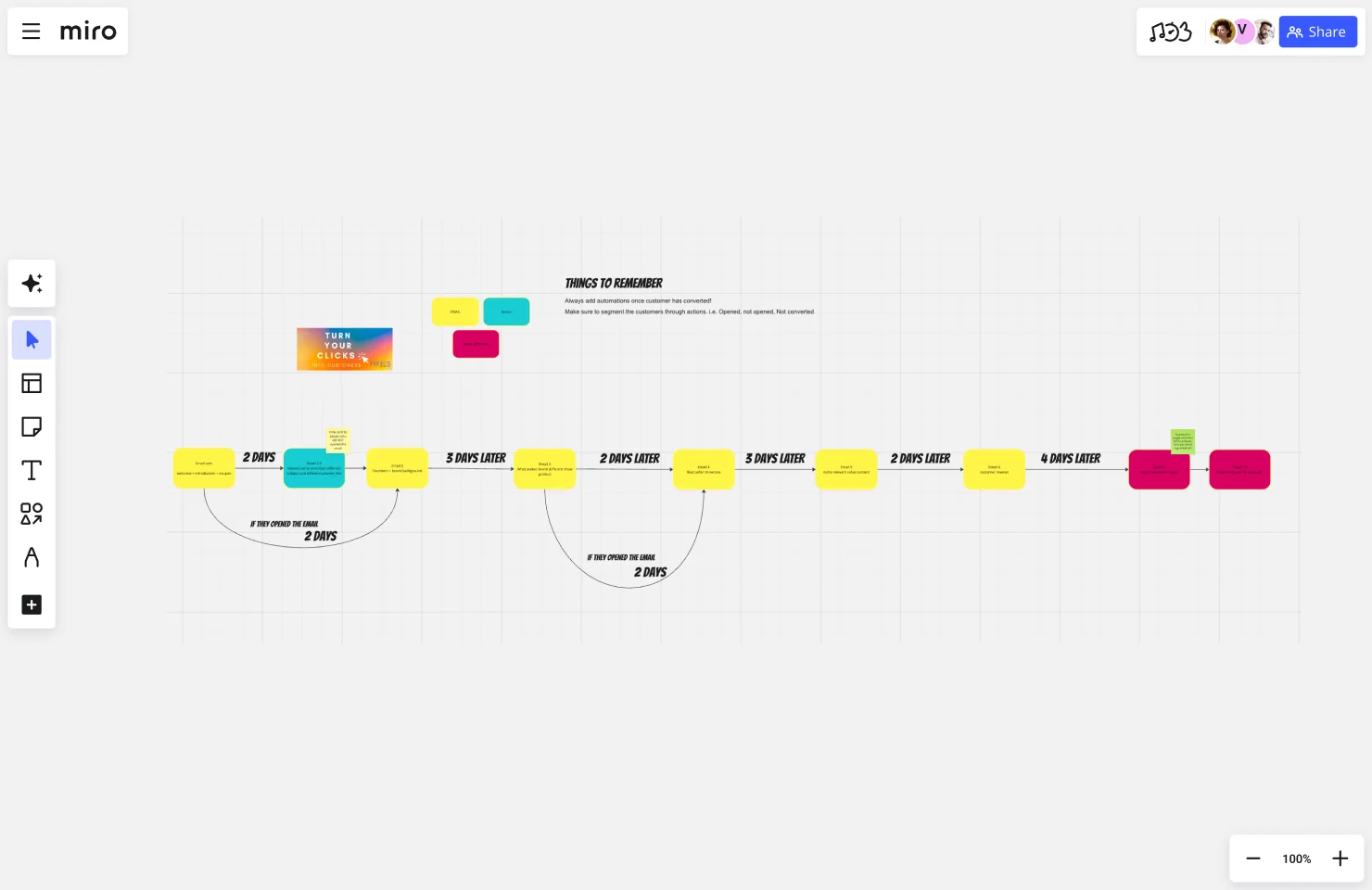
New Customer Journey - Emails Automations Template
This template is specifically designed for coordinating multi-channel campaigns with a focus on email automation flows. It’s perfect for mapping how email fits alongside LinkedIn, direct mail, and other channels in complex B2B campaigns.
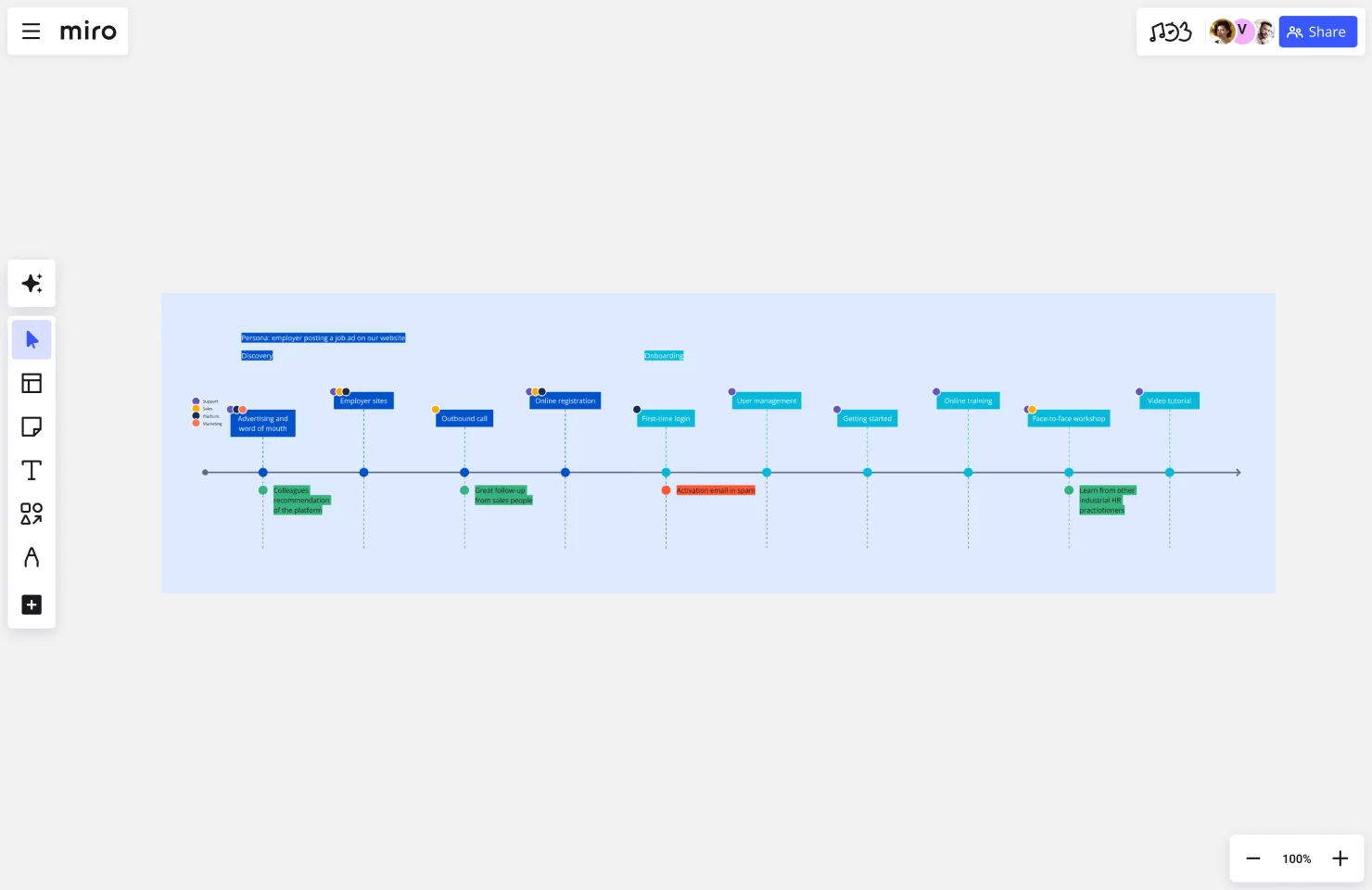
Atlassian Customer Journey Mapping Template
A comprehensive framework that includes sections for customer personas, journey stages, touchpoints, emotions, and pain points. Great for teams that want a detailed view of the entire customer experience.
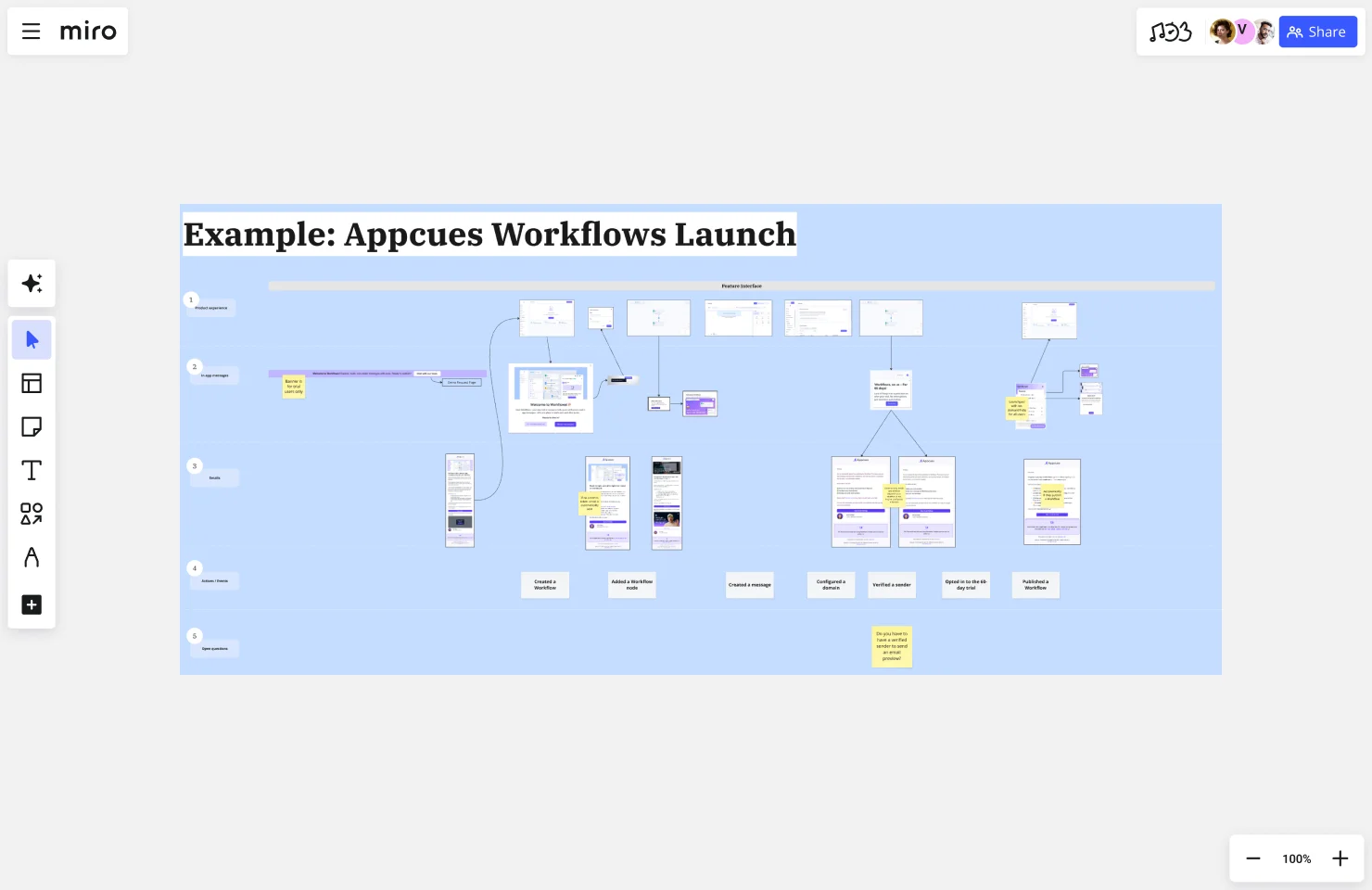
Feature Launch Communication Template
When launching new features, this template helps you plan the email journey around product releases, ensuring all stakeholders understand the communication plan, timing, and target audiences.
Template benefits
Saves 2-3 hours of setup time: Pre-built structure means you start mapping immediately instead of debating framework.
Ensures critical components are included: You won’t forget important elements like emotions or pain points.
Enables immediate team collaboration: Everyone can jump in and contribute without learning complex tools.
Provides flexible customization: Templates give you structure while allowing you to adapt to your specific business needs.
Quick customization tips
Add swim lanes specific to your business: Include product usage tier, account value, or customer lifecycle stage if those matter to your email strategy.
Adjust stage names to match your lifecycle: Don’t force your business into generic stages if they don’t fit.
Include KPIs most relevant to your goals: Every business measures success differently—customize metrics to what matters for you.
Color-code for priority or ownership: Use visual indicators to show which opportunities are quick wins vs. long-term projects, or which teams own each touchpoint.
Beyond static documents
Collaborative visual platforms offer advantages static documents can’t match:
- Real-time updates as your strategy evolves
- Linking to supporting documents (email copy, campaign briefs, analytics)
- Team voting and commenting on priorities
- Easy exports to different formats for various stakeholders
When you build your email marketing customer journey map in a collaborative workspace, it becomes a living strategy document your team actually uses, not just a PDF that sits in a folder and gets forgotten.
Email marketing customer journey map FAQs
How does Miro integrate with my existing email marketing tools?
Miro connects with platforms like Slack, Jira, Confluence, Asana, and Monday.com to turn journey map insights into action. When your team identifies a gap in your email marketing customer journey map, create a Jira ticket directly from that insight and track progress without leaving Miro. While Miro doesn’t directly integrate with ESPs like HubSpot or Mailchimp, teams export journey maps as PDFs or reference board links in campaign briefs and automation documentation.
Is Miro secure enough for mapping sensitive customer data?
Yes. Miro maintains enterprise-grade security with SOC 2 Type II certification, GDPR compliance, and ISO 27001 certification. All data is encrypted in transit and at rest. Granular permissions control who can view or edit journey maps, while SSO/SAML support and audit logs provide additional enterprise security. When mapping customer journeys with PII, follow best practices like anonymizing names and using aggregated data patterns.
Can I find pre-built templates from other companies in the Miro community?
Yes. The Miroverse community offers templates created by users worldwide, including industry-specific journey maps for SaaS, e-commerce, and B2B services. Search for “customer journey” or “email marketing” to find relevant frameworks. Preview templates before use, then click “Use Template” to create a customizable copy in your workspace. Companies like Atlassian and IDEO have shared their frameworks with the community.
How many team members can collaborate on a journey map simultaneously?
Miro supports unlimited simultaneous collaboration, though most email marketing teams find 5-15 collaborators optimal. Real-time features include live cursors showing where teammates are working, simultaneous editing without conflicts, built-in video chat, and asynchronous collaboration for distributed teams. For workshops with 10+ participants, assign facilitators to different journey stages and use timers to keep activities focused.
What happens if my team needs help or gets stuck during journey mapping?
Miro provides multiple support channels: AI assistance to organize research and generate initial components, template instructions with built-in guidance, video tutorials through Miro Academy, and a searchable help center. The Miro Community forum connects you with thousands of users, while the Miro experts directory offers certified consultants for complex projects. Enterprise customers get dedicated success managers for personalized guidance.
From email chaos to strategic clarity
Email marketing’s power isn’t in clever subject lines or flashy templates. It’s in understanding where customers are in their journey and meeting them with the right message at that exact moment.
Journey mapping transforms email marketing from educated guessing to strategic clarity. You see gaps where prospects silently churn. You spot conflicts where messages contradict each other. You align teams around shared understanding of the customer experience. You build automation that feels personal because it’s based on real behavior, not arbitrary timing.
Learn from Kolleno
They didn’t need fancier tools or bigger budgets. They needed to see their customer journey clearly and align teams around that shared vision. The result? 75% productivity increase, 50% more efficient meetings, and comprehensive planning that extends across their entire business—from marketing campaigns to product development to customer onboarding.
The transformation happened because visual mapping made invisible problems visible. When everyone could see the customer journey together, solutions emerged naturally.
Your path forward
Don’t wait for perfect data or complete alignment to start. Begin small and iterate:
- Pick one journey to map (trial-to-paid OR newsletter-to-MQL)
- Gather your team for a 90-minute mapping workshop
- Use a visual workspace everyone can edit together
- Identify your top 3 gaps or opportunities
- Build one improved workflow based on those insights
- Measure results, learn, and iterate
Start with the journey that matters most to your business today. For most B2B SaaS companies, that’s trial-to-paid conversion. For content businesses, it might be subscriber-to-customer. Choose the path where improvement would make the biggest impact on revenue.
The reality
Your customer’s journey is already happening right now. The question is: Are you designing their experience intentionally, or letting it happen by accident?
Visual customer journey email marketing mapping ensures you’re building email programs that guide customers toward success—not just sending messages into the void and hoping something sticks.
When DocuSign needed to scale quality and performance across their growing teams, visual journey mapping became essential. According to their teams, “Miro has helped create alignment, foster inclusivity, and boost innovation.” The platform gave them visibility into projects and reduced the information overload that comes with constant Zoom recordings and documentation.
Ready to start mapping your email customer journey?
Explore Miro’s customer journey mapping templates and transform how your team plans, executes, and optimizes your email strategy. Build the map that turns your email program from generic to genuinely helpful—from spray-and-pray to strategic conversations that move customers forward.
Your customers are on a journey whether you map it or not. The companies winning with email marketing are the ones guiding that journey intentionally, with clarity and purpose. Time to join them.
Read more
Join our 100M+ users today


